A free fax cover sheet helps identify your fax before the recipient reads the attached documents. It can show who sent the fax, who should receive it, and how many pages arrived. A clear cover page also reduces confusion when several people share the same fax number.
Direct answer: A fax cover page usually includes the recipient, sender, fax numbers, date, subject, and total page count. You can also add a short message, urgency label, or confidentiality notice. The page normally goes first, before the documents you want to send.
| Cover Page Item | What to Enter | Usually Needed? |
|---|---|---|
| To | Recipient’s name or department | Yes |
| From | Your name or business | Yes |
| Recipient fax number | Number receiving the transmission | Yes |
| Sender phone or fax | Your return contact information | Recommended |
| Date | Date the fax is sent | Yes |
| Number of pages | Usually includes the cover page | Yes |
| Subject | Short description of the documents | Recommended |
| Message | Brief instructions or explanation | Optional |
| Confidentiality notice | Privacy warning for sensitive material | When appropriate |
Key Takeaways
- Put the cover page before every other page in the transmission.
- Include enough information to route the documents to the correct person.
- State whether the page count includes the cover page.
- Use a short subject instead of describing sensitive details unnecessarily.
- Confirm the destination number before sending confidential information.
- Choose a simple layout that remains readable after fax transmission.
What Is a Free Fax Cover Sheet?
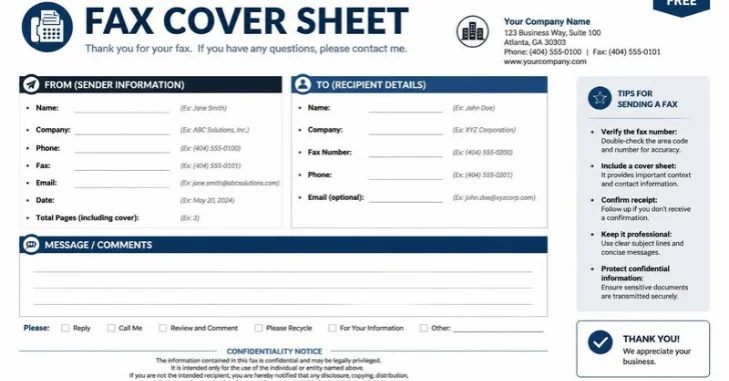
A Free Fax Cover Sheet is the first page of a fax transmission. It provides routing and contact details before the recipient reaches the actual documents. Businesses commonly use one when a fax machine or online number serves several employees.
The page also helps the recipient confirm whether the complete transmission arrived. A stated page count makes missing pages easier to notice. Clear sender information gives the recipient someone to contact when a problem occurs.
A cover page does not need elaborate graphics or branding. In fact, a clean black-and-white design often works better for faxing. Small text, light colors, and detailed images may become difficult to read.
What Information Should You Put on the Cover Page?
Start with the recipient’s name, department, or organization. Add the destination fax number so staff can verify where the transmission was intended to go. These details are especially useful in hospitals, government offices, law firms, and larger companies.
Next, identify yourself with your name and organization when relevant. Add a telephone number or return fax number if a response may be needed. An email address can also be useful, although it is not essential for every transmission.
Enter the date and total number of pages. Clearly state whether that number includes the first page. This small detail prevents recipients from incorrectly assuming that one page failed to arrive.
Finish with a short subject and optional message. Keep the subject specific without exposing unnecessary confidential details. For example, “Signed Lease Documents” is clearer than a long explanation.
How to Use a Free Fax Cover Sheet
The easiest approach is to prepare the cover page before attaching your main documents. Check every field before sending because an incorrect destination number can create privacy problems. The following process works with traditional machines and most online fax services.
- Enter the recipient. Add the person’s name, company, department, and destination number.
- Add your details. Include your name and a reliable return contact method.
- Enter the date. Use the date on which you plan to send the transmission.
- Count every page. Include the first page when the form requests the total transmission count.
- Write a clear subject. Describe the purpose in a few words without revealing unnecessary sensitive information.
- Add instructions if needed. Request a reply, mark the fax urgent, or provide a short routing note.
- Review the number. Confirm the destination before sending, especially for confidential documents.
- Send the cover page first. Place it before the documents in the fax queue.
The same workflow applies when using a downloadable PDF or Word template. Online services may place the page automatically before uploaded files. Traditional machines require you to arrange the physical pages in the correct order.
Businesses can also make the process part of a standard communication workflow. Bussinify’s guide to free conference call services covers another low-cost option for business communication. Using consistent procedures across communication channels can reduce avoidable mistakes.
Blank, Business, Confidential, and Medical Options
Not every transmission needs the same layout. A personal fax may need only names, numbers, date, page count, and a message. A business transmission may add company names, departments, email addresses, and response instructions.
A confidential version usually adds a visible privacy label and a notice for unintended recipients. That notice can ask an unintended recipient to contact the sender and dispose of the material. The wording should match your organization’s legal or privacy policies.
Medical transmissions deserve additional care because they can contain protected health information. The U.S. Department of Health and Human Services permits certain treatment communications by fax when reasonable safeguards are used. HHS specifically gives number verification as an example of a reasonable safeguard.
A confidentiality message does not make a transmission automatically HIPAA compliant. Covered organizations must consider their broader administrative, technical, and physical safeguards. The cover page should support those procedures rather than replace them.
Simple U.S. Fax Cover Page Example
A good template does not need dozens of fields. It needs enough information to identify the sender, recipient, and transmission. The following layout works for many routine U.S. business and personal situations.
FAX
To: Jordan Smith
Company: ABC Services
Fax: (555) 555-0123
From: Taylor Brown
Company: Brown Consulting
Phone: (555) 555-0188
Date: October 10, 2026
Pages: 5, including cover
Subject: Signed Service Agreement
Message: Please confirm receipt when convenient.
This example keeps private information out of the subject and message fields. It also makes the page-count convention clear. You can remove company fields when sending personal paperwork.
Should the Cover Page Count as Page One?
In many office templates, the first page is included in the total page count. The sender should remove any uncertainty by stating the convention directly. Writing “5 pages, including cover” is clearer than entering only the number five.
Some organizations may follow their own internal counting method. Always follow the receiving office’s instructions when they provide one. Government agencies, insurers, medical offices, and financial institutions sometimes specify exactly how documents should be submitted.
If no instructions exist, counting the first page is a practical approach. Several popular U.S. templates explicitly label the field as pages including the cover. The important point is consistency and clear wording.
Do You Always Need a Cover Page?
There is no single rule requiring one for every ordinary fax. The recipient’s instructions and the sensitivity of the documents should guide your choice. A cover page is especially useful when a shared fax number serves several people.
You may also use one when sending contracts, applications, financial forms, or business records. It gives staff an immediate routing reference without opening every attached page. This can save time in offices handling many incoming documents.
Document handling matters after transmission as well. Businesses managing large volumes of records can review Bussinify’s guide to file archiving and data management. Good document practices cover sending, receiving, storing, and disposing of information.
Common Mistakes to Avoid
The most serious mistake is sending documents to an unverified number. Confirm the destination when the fax contains medical, financial, legal, or other sensitive information. HHS specifically recommends reasonable safeguards when protected health information is transmitted.
Another common mistake is leaving out the intended recipient. A shared office machine may receive documents for dozens of people. Adding a department or attention line can help staff route the transmission correctly.
Avoid putting sensitive details in the subject line unless they are necessary. The first page may be visible before the remaining documents reach the intended person. Use a neutral but useful description whenever possible.
Finally, do not overload the design with color, photos, or tiny text. Fax technology can reduce image quality during transmission. A simple layout with clear labels remains easier to read.
Using Faxing in a Modern Business Workflow
Faxing still appears in workflows involving healthcare, legal records, finance, government forms, and signed documents. Some organizations use online services instead of maintaining a physical machine. The basic routing information remains useful in either format.
Remote businesses should also document who can send, receive, and store sensitive material. Bussinify’s article about work-from-home flexible hours discusses broader remote-work practices. Clear communication procedures become more important when employees work across several locations.
Small companies can keep a reusable template with approved wording and branding. Staff can duplicate it instead of rebuilding the page for every transmission. The template should still be checked for current recipient details each time.
Final Check Before You Send
Review the recipient’s name and destination number before starting the transmission. Confirm the page count, subject, and return contact details as well. Sensitive documents deserve an extra number check before you press send.
A free fax cover sheet should make document delivery clearer rather than more complicated. Keep the layout simple, use only necessary information, and follow any instructions provided by the receiving organization. For repeated business use, save an approved template and update the recipient fields for each transmission.
Frequently Asked Questions
Where can I get a free fax cover sheet?
You can use a printable PDF, an editable Word document, or an online form. Many template providers offer basic versions without requiring custom design work. Choose a format that fits your fax service and editing software.
Do I need a fax cover sheet for every fax?
Not necessarily, unless the recipient or your organization requires one. Using one is helpful when documents need routing, page verification, or privacy instructions. Sensitive transmissions may also require additional procedures beyond the first page.
What should I write in the message area?
Keep the message brief and relevant to the recipient. You can request confirmation, explain the requested action, or mention an attached form. Avoid including private details that do not need to appear on the first page.
Does a confidentiality notice make a fax HIPAA compliant?
No. HHS requires covered entities to use reasonable safeguards when protected health information is transmitted. A notice can support those safeguards, but it cannot replace the organization’s required privacy and security procedures.
Should the total number of pages include the first page?
Many templates count the first page as part of the total. You should state this clearly rather than relying on an unstated convention. Writing “including cover” removes uncertainty for the recipient.